
A few months back, we did something a lot of agencies won’t do. We threw out our own website and rebuilt the whole thing from scratch.
Not a redesign. Not a refresh. A full demolition and rebuild on a completely different stack. No WordPress, no Elementor, no plugin soup, no monthly hosting fees.
The result is the site you are reading right now. And the numbers behind it are kind of ridiculous.
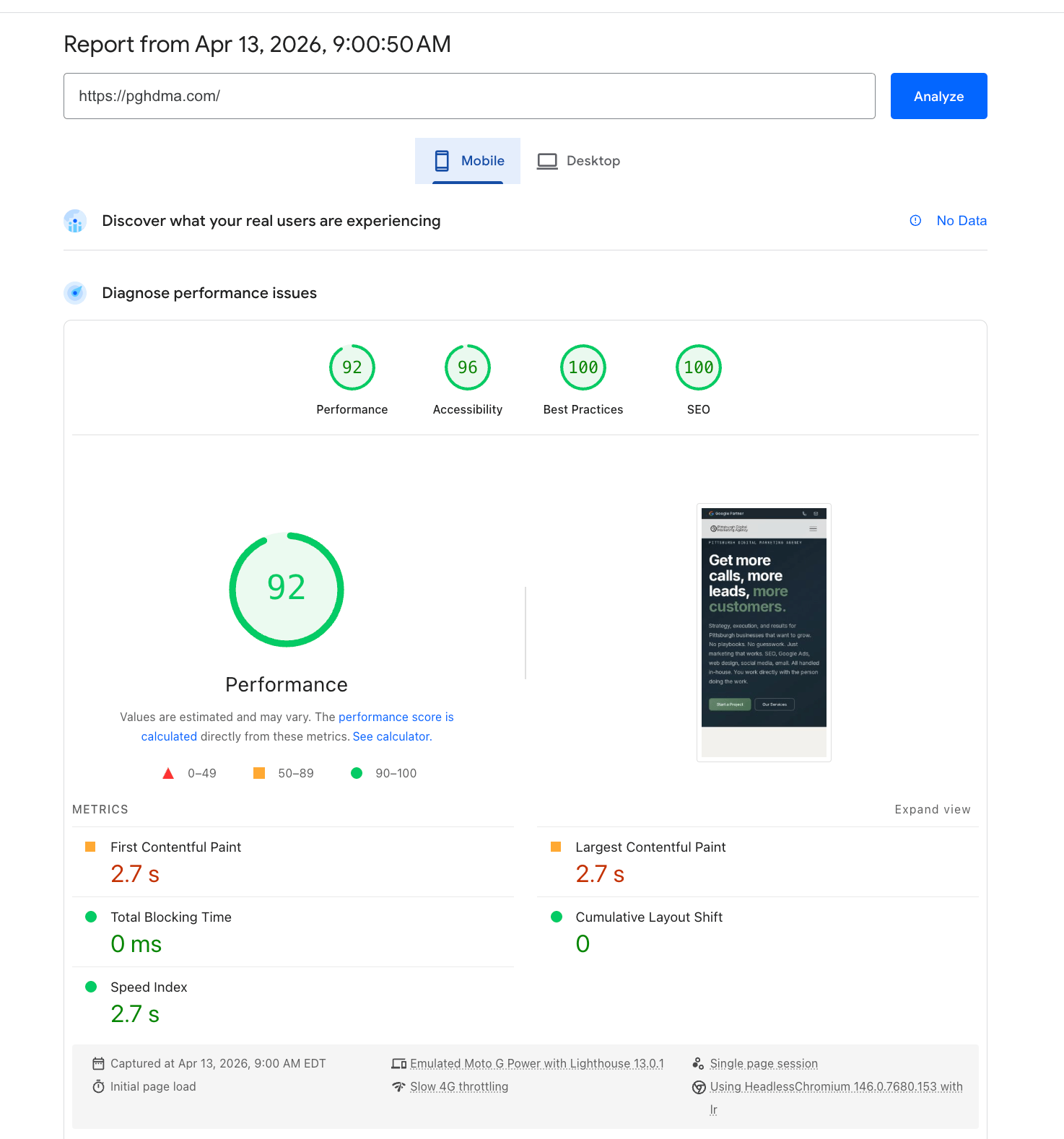
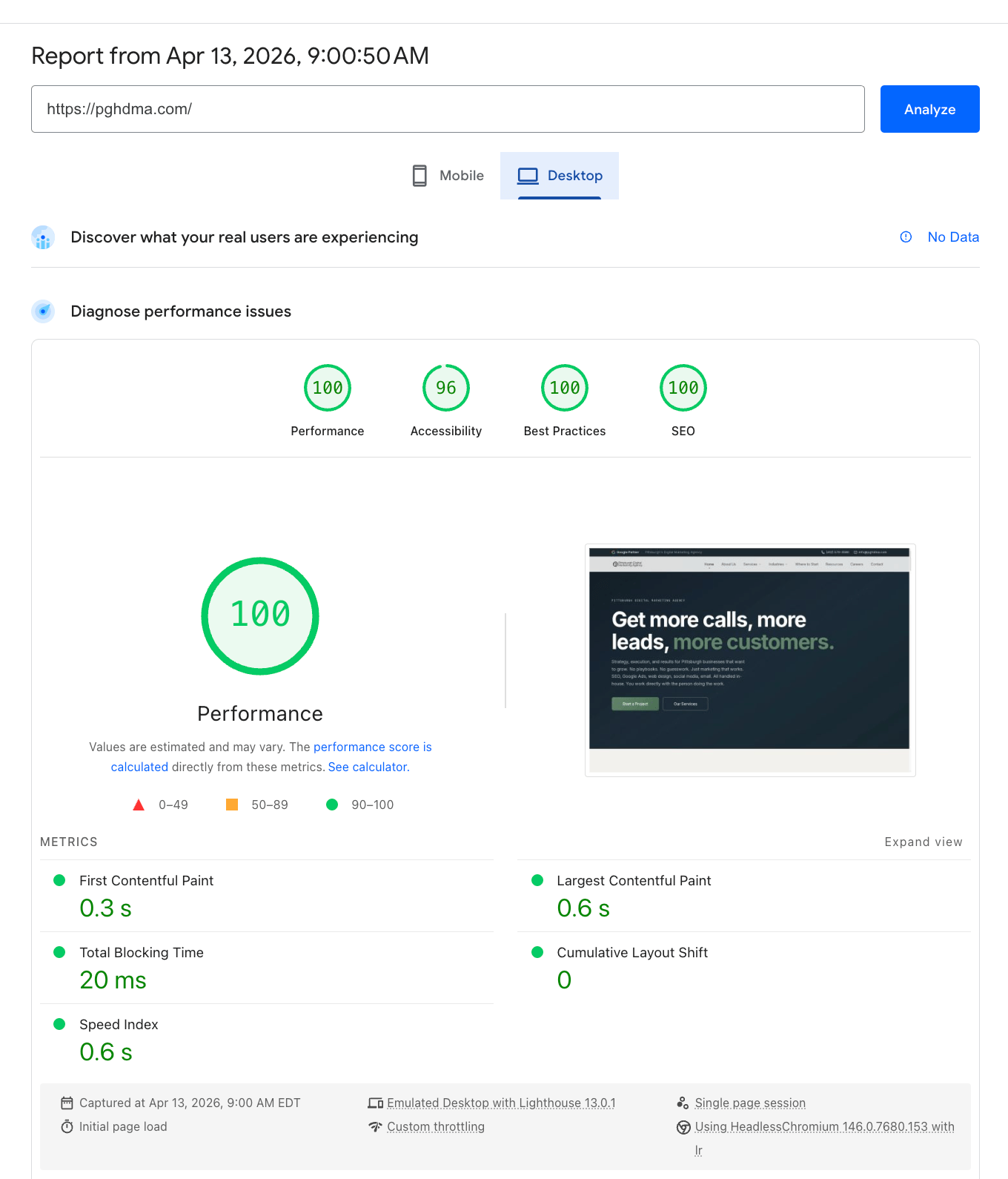
Here is the story of why we did it, what we replaced, and why it matters if you are running a small business website that is built on the same stuff ours used to be.
Our Old Site Was Embarrassing
Look, we are a digital marketing agency. Our website is supposed to be the proof. The thing that makes a potential client think “if these people built that, they can build mine.”
The site we had a few months ago was not that. Not even close.
It was WordPress. It was Elementor. It had thirty-something plugins, a theme called Digimax that we never actually customized, and pages that took five seconds to load on mobile. The HTML was a soup of nested divs, generic stock photos of people in suits shaking hands, and giant blocks of comma-separated keywords stuffed at the bottom of every page hoping Google would care. It looked like every other agency website on the internet because it basically was every other agency website on the internet.
PageSpeed scores in the 50s on mobile. Cumulative Layout Shift everywhere. JavaScript bundles bigger than the entire useful content of the page. The worst part was that we were paying a hosting company every month for the privilege of running it.
If a client showed us this site and asked us to rebuild theirs, we would have given them a real talking-to.
So we gave ourselves the same talking-to.
What Was Actually Wrong
Before we get into the rebuild, let’s name what was broken. Because if you are running a WordPress Elementor site right now, this list might feel uncomfortably familiar.
Elementor itself was the biggest problem. Page builders are great for non-developers who need to ship a site fast. But the trade-off is they generate insane amounts of bloated HTML and CSS to support every conceivable layout option you might use someday. Every section gets wrapped in three or four extra divs. Every animation loads JavaScript libraries you might never trigger. Every responsive setting writes inline styles that override your stylesheet. By the time the page hits the browser, it is downloading hundreds of kilobytes of code just to render a hero section and three columns.
Plugin overload. WordPress sites accumulate plugins the way junk drawers accumulate cables. Each one loads its own scripts, its own CSS, its own database queries on every page request. Even disabled plugins often leave hooks running. Our old site had a security plugin, a caching plugin, a forms plugin, an SEO plugin, a backup plugin, an analytics plugin, an image optimizer, a contact form anti-spam plugin, a related posts plugin, a sitemap plugin, and so on. Each one made the site a little slower and a little more fragile.
Stock photos that meant nothing. Three guys in suits shaking hands in front of a window. A close-up of a keyboard. A diverse team smiling at a laptop. None of it was real, none of it was Pittsburgh, and none of it built any trust with anyone who looked at it for more than two seconds.
Keyword spam blocks. At the bottom of every page there was a wall of comma-separated phrases like “Pittsburgh SEO, Pittsburgh digital marketing, Pittsburgh PPC, Pittsburgh web design” and on and on for two hundred terms. This was an SEO tactic from 2008. It does not work. It actively hurts you. We left it there for years anyway because the previous setup made it hard to remove without breaking something.
Generic copy. The about page sounded like it could have been on any agency site in any city. The service pages described what we did in the same language every other agency uses. Nothing in the words said anything specific about Pittsburgh, about us, or about the actual people who would call us.
Hosting that cost money for no reason. We were paying a managed WordPress host monthly to serve a site that had maybe a few thousand visitors a month. They were charging us for performance optimization that the site did not actually have.
It was a website that we, of all people, should have known better than to put online.
The New Stack
We rebuilt the site on a completely different foundation. Every choice was made with one question in mind: what is the simplest, fastest, most boring thing that will actually do the job?
Astro for the site itself. Astro is a static site generator. You write your pages and components, run a build command, and it spits out plain HTML files. No database. No server-side rendering at request time. No JavaScript framework hydrating in the browser. Just HTML and CSS, the way the web worked when it was fast. We use small bits of vanilla JavaScript only where we actually need interactivity, like the mobile menu and the testimonial carousel. Everything else is zero JS.
If you have never heard of Astro, that is about to change. Astro just got acquired by Cloudflare a few months ago, and the framework is being used by Porsche, IKEA, and OpenAI for parts of their public websites. It is having a moment, and for good reason. It does one thing extremely well: it ships HTML and only the JavaScript you actually need.
Cloudflare Pages for hosting. Cloudflare Pages serves static sites for free. Not “free trial.” Not “free up to a small limit.” Genuinely free for the kind of traffic a small business website gets. You upload your built files, Cloudflare distributes them to edge servers in 300+ cities around the world, and visitors get the page from the closest one. There is no origin server to keep alive, no PHP process to spin up, no database to query. The HTML is already on the edge before anyone asks for it.
Cloudflare Workers for the contact and careers forms. Forms are the one thing on a static site that needs a server. We wrote a small Cloudflare Worker that takes the form submission, verifies it is not a bot, sends an email through Gmail, and stores a backup copy. The Worker runs on Cloudflare’s edge too, so it is fast everywhere, and it is also free for our volume.
Cloudflare Turnstile for bot protection. This replaced Google reCAPTCHA. Turnstile is invisible most of the time, does not track users, and most importantly, does not load 700 kilobytes of JavaScript onto every page just to verify that humans are humans. We saved almost a megabyte of JavaScript site-wide by switching.
Cloudflare KV for submission storage. Every form submission gets a backup copy stored in Cloudflare’s key-value store, so even if an email goes missing, we still have the record.
Markdown for content. Every page on this site, including this blog post, is written in plain markdown. No WYSIWYG editor. No content management database. To publish a new article, we add a markdown file and rebuild. It takes about thirty seconds end to end.
Git and GitHub for everything. The whole site lives in a private Git repository. Every change is tracked, every version is recoverable, and there is no admin panel to log into. If we ever wanted to switch hosting providers, we could deploy the same files anywhere in about ten minutes.
That is the whole stack. Astro, Cloudflare Pages, Workers, Turnstile, KV, Git. Most of it is free. The only thing we pay for is the domain name.
What Changed
The numbers tell most of the story. Let me lay it out plainly.
| Before (WordPress + Elementor) | After (Astro + Cloudflare Pages) | |
|---|---|---|
| PageSpeed Mobile | Mid 50s | 92 |
| PageSpeed Desktop | Mid 70s | 100 |
| Largest Contentful Paint (mobile) | 5+ seconds | 2.7 seconds |
| Largest Contentful Paint (desktop) | 3+ seconds | 0.6 seconds |
| Cumulative Layout Shift | Visible jumping | Zero |
| Total Blocking Time (desktop) | Hundreds of ms | 20 ms |
| JavaScript shipped | Massive bundles | Almost none |
| Hosting cost | Monthly fee | $0 |
| Database | MySQL (slow, fragile) | None |
| Plugin count | 30+ | 0 |
| Time to publish a new article | 10+ minutes through admin | 30 seconds via Git |
The Lighthouse scores are the headline. 92 on mobile, 100 on desktop. Those are not numbers you can fake or buy. They come from doing the basic things right. Ship less code. Avoid layout shift. Cache aggressively. Defer anything that does not need to load immediately.
But the more interesting story is what those numbers translate into.
Why This Matters For SEO
Google has been telling everyone for years that page speed and Core Web Vitals are ranking factors. Most websites ignore them anyway because the cost of fixing them feels enormous. You would have to redesign the site, change platforms, retrain your team, deal with months of disruption.
So most agencies shrug and tell their clients to add a caching plugin. Which does not actually fix the underlying problem.
But Google’s algorithm is not shrugging. Pages that load fast and stay stable get rewarded. Pages that take five seconds to render and shift around as they load get pushed down. It is a small signal among many, but it compounds. Two sites with otherwise similar content and authority will not rank the same if one of them feels broken on a mobile phone.
Our old site was the broken-feeling one. Now we are the other one.
We are already seeing the effect. Within weeks of the new site going live, our impressions in Google Search Console climbed, our average position improved across our target keywords, and the bounce rate on mobile dropped dramatically. That is what happens when you stop fighting the algorithm and start working with it.
Why This Matters For Conversions
Speed is also a conversion factor, not just a ranking one. There is a famous study from Google that found mobile bounce rates climb 32 percent when page load goes from 1 second to 3 seconds, and 90 percent when it goes from 1 to 5 seconds. Every extra second you make a visitor wait is a visitor you are losing.
When somebody clicks your Google Ads link or finds you through a search, you have maybe two seconds before they decide whether your site is worth their attention. If they are still staring at a blank screen at the three-second mark, they hit the back button and click your competitor instead. You paid for that click and got nothing.
Our contact form gets used now. The footer email signup gets used now. The phone number in the header gets clicked now. None of that was happening at the rate it should have been before, and the only thing that changed was how fast the site loads and how clean it looks.
Why This Matters For Cost
Here is the part nobody talks about. We used to pay a hosting company every month. Now we pay zero. Cloudflare Pages and Workers are free for our traffic level, and they will stay free unless we get hit with millions of visitors per month, which would be a great problem to have.
The math on the old setup looked like this: a few hundred dollars a year for hosting, more for domain, more for premium plugins, more for a security service, more for backups, more for caching, and more for whoever was supposed to be keeping it all updated. A small WordPress site can easily eat through fifty to a hundred dollars a month in subscriptions before you have hired anyone to actually do anything.
The math on the new setup is just the domain. Twelve dollars a year. That is it.
Why This Matters For Control
The biggest reason to make this switch was not speed or cost. It was ownership.
When your website lives on WordPress with a stack of plugins you did not write, you do not really own it. You rent it from the people who maintain those plugins. If a plugin gets abandoned, you have to scramble to replace it. If a plugin gets a security vulnerability, you have to patch it before you get hacked. If WordPress core changes how something works, your theme might break overnight. You spend more time keeping the site alive than you do actually using it.
Our new site is a folder of HTML and CSS files. There is no plugin to break. There is no admin panel to get hacked. There is no database to back up. Every change is committed to Git, every deploy is reproducible, and if Cloudflare ever stopped existing tomorrow, we could host the exact same files anywhere else with no changes.
We own every line of code. We can read every line of code. Nothing is happening on this site that we did not put there ourselves.
That feels different. It feels like the site belongs to us, not to a hosting company and not to a plugin ecosystem.
Should You Do This?
I am not going to pretend this rebuild was free. It took real time and real expertise. Astro is not WordPress. You cannot drag and drop your way through it. You need somebody who can actually write code, and not many small business owners are going to want to do this themselves.
But here is what I will tell you. If your website is running on WordPress with a page builder, and your PageSpeed mobile score is below 70, and you are paying for hosting and plugins every month, and you cannot remember the last time you felt good about your site, you are paying twice. You are paying for the slow site you have, and you are paying again in the leads you never got because the site was too slow to convert them.
You do not have to rebuild your site on Astro to fix this. There are other static frameworks. There is even managed WordPress hosting that handles a lot of the bloat for you, if you absolutely need to stay in the WordPress world. The tools are not the point.
The point is that fast websites win, and slow websites lose. If your site is in the second category, fix it. If you are not sure how to fix it, talk to somebody who can actually look at it and tell you what is wrong, instead of just selling you another plugin.
We are happy to be that somebody. The contact form on this site is fast and it works, and an actual human reads it within 24 hours. That is the same human who is going to be doing the work, not a sales rep, not a project manager, just the person who would build the site. You can reach us through the contact page or call us at (412) 579-3580.
And if you want to know what your site is doing right now, run it through PageSpeed Insights yourself. It is free, it takes 30 seconds, and the results will probably surprise you. If they look anything like our old scores, we should talk.